





Description
🔄Bobcat attachments on any brand
🔌Plug in and go
🏭Patent pending
📘 Overview
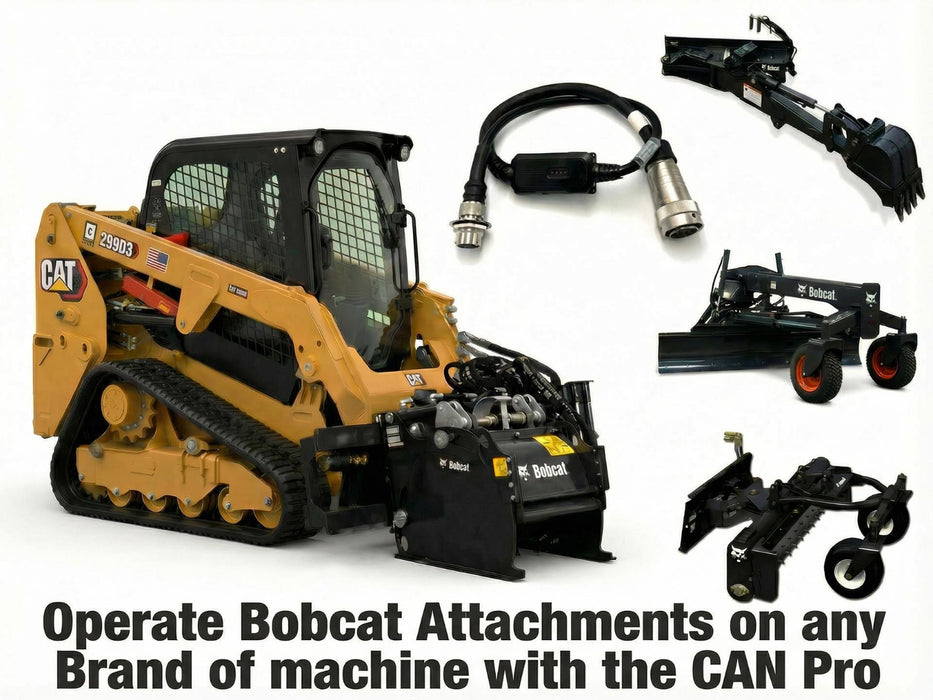
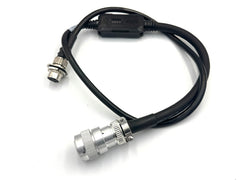
The CAN PRO runs Bobcat CAN attachments on machines that are not Bobcats. It plugs into the 14-pin connector on your loader and converts the machine's 12-volt outputs into the CAN communication language Bobcat attachments expect — so the attachment behaves exactly as it would on a Bobcat machine.
The attachment's own controller stays in place. Older approaches required finding and removing the CAN control box fitted to every Bobcat attachment since 2000, then wiring solenoids directly. The CAN PRO makes that unnecessary — it speaks the machine's side of the conversation instead. Choose your machine brand from the options above and the correct configuration ships.
⚙ Key Features of the CAN PRO Controller
- Configured per machine brand — eight versions covering Gehl/Mustang/Manitou/Wacker/JCB/Volvo, Cat D and Next Gen, Kubota/Case/New Holland, John Deere P series, John Deere G series, SANY, Takeuchi and Yanmar/ASV
- Attachment controller stays fitted — no stripping out the Bobcat control box
- Shift function doubles the controls — four primary controls become eight through the machine's shift key
- Laser grading support — Bobcat BRL2 and LR410 receivers plus Trimble Earthworks GO, subject to controller firmware
- Runs 96-inch and 108-inch Bobcat graders — including all-up and all-down on a two-button press
- Also runs Bobcat tree spades, cold planers, dozers, snow blowers, brooms, soil conditioners and stump grinders
🔑 Why the CAN PRO Changes What Your Machine Can Run
- Buy attachments on merit, not on badge — Bobcat attachments become usable on a Kubota, Deere, Cat or Takeuchi machine
- No attachment modification — the tool still works on a Bobcat afterwards, so resale value is untouched
- Suits mixed fleets and rental — move one attachment between machine brands instead of buying duplicates
- Familiar control layout — controls are remapped to mirror the original Bobcat arrangement
📊 CAN PRO Specifications
| Specification | Value |
|---|---|
| Machine-side connector | 14-pin |
| Function | Converts machine 12V outputs to Bobcat CAN language |
| Primary controls | 4, doubling to 8 via the shift function |
| Laser receivers supported | Bobcat BRL2, Bobcat LR410, Trimble Earthworks GO |
| Configuration | Select your machine brand from the options |
| Manufacturer | Skid Steer Genius |
📋 Choose Your Machine Brand
| Machine brand | Notes |
|---|---|
| Gehl / Mustang / Manitou / Wacker / JCB / Volvo | Also covers pre-2000 Bobcat 14-pin machines |
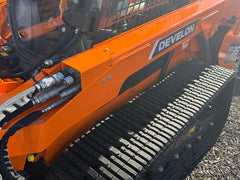
| Cat D / 255 / 265 / 275 / 285, Develon, Hyundai | Aux 8 must be switched on for power; Aux 7 acts as the shift key |
| Kubota / Case / New Holland | Shift function assigned to the J switch |
| John Deere P series | Eight primary controls available |
| John Deere G series | Supplied with the switch kit needed for 7th, 8th and laser functions |
| SANY | Shift assigned to the L switch |
| Takeuchi | Shift assigned to the J switch; 11R models reach all controls directly |
| Yanmar / ASV | 14-pin machines with a J switch |
🚜 Which Machines Does the CAN PRO Fit?
| Brand | Models |
|---|---|
| Caterpillar D-Series / D3 | 236D, 242D, 246D, 257D, 259D, 262D, 289D, 299D, 259D3, 289D3, 299D3 |
| Caterpillar Next Gen | 255, 257, 262, 265, 270, 275, 289, 299 |
| John Deere | 317G, 323E, 325G, 331G, 331P, 333G |
| Kubota SVL | SVL65, SVL75, SVL90, SVL95, SVL97 |
| Takeuchi | TL10, TL12, TL130, TL140, TL150, TL240 |
| Case / New Holland | SR117, SR121, SR200, SR210, SR270, TV370, TV380 |
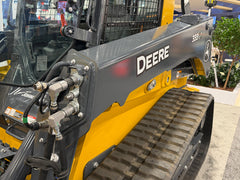
Hydraulic couplers must be swapped on every brand except Bobcat. The flow has to run forward for high-flow features to work — swap the attachment couplers or fit gender-changing couplers. Valve bodies are usually stamped P (A) for pressure and T (B) for tank; the female attachment coupler belongs on the P (A) pressure line. Do this before attempting to operate the CAN PRO.
John Deere machines built before 2020 have no Pin K, so a power pin must be added for the CAN PRO to operate. On Develon and Hyundai machines the Aux 8 circuit occasionally cannot carry the load, in which case the socket moves from J to P using the supplied tool.
❓ CAN PRO Questions, Answered
Do I have to remove the black controller box from my Bobcat attachment?
No — that is the point of the CAN PRO. It converts your machine's outputs into the CAN language the attachment already speaks, so the attachment's own controller stays fitted and the tool is unmodified. Older approaches required stripping that box out and wiring solenoids directly.
Which version do I need?
Select your machine brand from the options. Each version is configured for that brand's control layout and pin arrangement — a Cat version will not work correctly on a Kubota. John Deere is split into P series and G series because the two need different configurations.
Why is the John Deere G series version more expensive?
G-series machines need an additional switch fitted into the back of the 14-pin connector to act as the shift key, which is what makes the 7th, 8th and laser functions available. The G-series version is supplied with that switch kit included.
Do I need to change my hydraulic couplers?
On every brand except Bobcat, yes. The hydraulics must run in the forward direction for high-flow features to operate — either swap the attachment couplers or fit gender-changing couplers. The female attachment coupler goes on the pressure line, usually stamped P or A on the valve body. Do this before trying to operate the CAN PRO.
Will the CAN PRO run a Bobcat grader?
Yes, including 96-inch and 108-inch graders, with all-up and all-down available on a two-button press. Laser grading is supported through Bobcat BRL2 and LR410 receivers and Trimble Earthworks GO, subject to the controller's firmware revision.
How do I get more than four controls?
The shift function doubles them. Holding the shift key and pressing the same primary buttons accesses a second set, giving eight functions from four switches. Which switch acts as shift depends on the machine brand — the J switch on Kubota, Case, New Holland and Takeuchi, the L switch on SANY, and Aux 7 on Cat, Develon and Hyundai.
My John Deere is older — is there anything extra?
John Deere machines built before 2020 do not have Pin K fitted, so a power pin must be added for the CAN PRO to operate. Machines from 2020 onward have it as standard.
Do I need a high flow jumper?
If your attachments are high-flow rated, yes. A jumper inside the 14-pin connector activates the machine's high-flow circuit — it goes into position K on XPS machines and position N on XE and XHP machines. Note that not all attachments are rated for super-flow pressures, so check the attachment rating first.
Will Cat SMART attachment controls work through it?
No. On Caterpillar machines the Aux 9 through 12 controls are CAN-based and reserved for Cat SMART attachments. The CAN PRO works with the analog outputs — Aux 3, 4, 5 and 6 — using Aux 7 as the shift key. Aux 8 must be switched on to power the controller.
What software revision do I need for laser control?
Laser receiver support requires Rev C software or above on the controller. That covers the Bobcat BRL2 and LR410 receivers and Trimble Earthworks GO. If laser grading is the reason for your purchase, email us at support@eskidsteer.com or click the chat icon on any page before ordering so we can confirm the revision supplied.
How do I tell which connector my machine has?
Count the positions, including the empty ones — not the pins that happen to be fitted. Manufacturers routinely populate fewer positions than the housing supports, so a connector showing seven or eight terminals may still be a 14-position housing.
📊 Technical Information
- Not compatible — Bobcat Chipper. Uses a RACS controller, which the CAN PRO cannot drive.
- Not compatible — Bobcat Concrete Pump and Mixer. Also RACS-controlled.
- Mulcher requires a brake bypass kit to release the brake. Once bypassed, the controls operate normally.
- Confirmed attachments: 84-inch and 96/108-inch graders including laser control with LR410 and BRL2 receivers, dozer blade, wheel saw, stump grinder, V-plow, tree spades, snow blower, all models of cold planer, box blades with lasers, Bob-Tach mounted mini backhoe, rotary broom and soil conditioner. Trimble Earthworks GO is supported.
- Some Kubota machines ship with sticks missing controls. If only two of four functions work, those functions are absent from your sticks. Two pins can be moved to reach them — otherwise no attachment needing more than four functions will run, including graders and cold planers.
- Some Caterpillar machines are missing Aux 3 and Aux 4 — the switches beside the right roller that turn the hydraulics on and off. Those switches must be installed for the CAN PRO to operate at all.
- High flow jumper. A hidden jumper inside the connector activates high flow — connect to K for XPS, or N for XE and XHP. It must be removed again when switching back to low-flow attachments.
Before you order — a caveat about factory controls. Both ends of this product are built to factory pin specifications using original factory parts. What cannot be guaranteed is that your machine was ordered with all the factory controls fitted, or that your attachment is pinned to match. This is especially common with auction attachments and second-hand purchases. Tools and instructions for moving pins are included so everything can be brought into alignment.
Ordering, Shipping & Returns
Ordering. Add the item to your cart and check out online. Have your machine make, model and serial number to hand so fitment can be confirmed before you order.
Shipping. Calculated at checkout — enter your delivery address and the charge is shown before you complete the order.
Returns. Within 7 days of receipt, item new and unused. A 25% restocking fee applies and return shipping is the customer's responsibility unless the error was ours.
Not sure it fits? Email us at support@eskidsteer.com or click the chat icon on any page before ordering — confirming your connector type is the simplest way to avoid a return.
📥 CAN PRO Documentation
Disclaimer
Bobcat®, Caterpillar®, John Deere®, Kubota®, Case®, New Holland®, Takeuchi®, JCB®, Volvo®, Gehl®, Mustang®, Manitou®, Develon®, SANY®, Terex® and ASV® are registered trademarks of their respective owners in the United States and various other countries. All rights reserved. This is not a product of any of them, and it is not endorsed by any of them. We are in no way attempting to make you think this is an original equipment product. Brand and model names are used solely to identify the machines and attachments this product is designed to work with.
Shipping
The following are estimated processing and delivery times. We make every effort to fulfill orders as quickly as possible.
We only deliver within the United States. If a package can’t be delivered due to an error entering your shipping address, Eskidsteer is not responsible for any additional fees that may incur to reroute or reship the package.
By placing an order through this Website you will be agreeing to the terms below. These are provided to ensure both parties are aware of and agree upon this arrangement to mutually protect and set expectations for our service. Please read our Terms of Service.
How do I place an order?
We do not take orders on the phone for security reasons. To place an order, go to a product page, select the desired quantity of the item, and add it to your cart via the “Add to Cart” button. During checkout, you just need to enter or confirm your shipping address and credit card information, then you can place your order
Shipping fee:
Delivery Time= Handling time +Transit Time:
Handling time: 3-3 Days
Transit time: 5-8Days
Order cut off Time: 5:00 PM (GMT-05:00) Eastern Standard Time (New York)
Which shipping carriers do you use to ship?
All Shipments are done with LTL Carriers, UPS, FedEx, DHL, and USPS
Failure to Accept Products on Delivery
If you reject delivery of goods ordered from us, or otherwise fail to accept delivery of the goods, you agree to pay for all related and additional shipping fees, duties, taxes, restocking fees and other charges arising from such failure to accept delivery. After such failure to accept delivery of the goods, it shall be your responsibility to pay for and arrange a new shipping date.
Tracking Information:
We also provide tracking numbers for all orders. Once your order has been shipped, we will provide you with a tracking number that you can use to track the progress of your package. You will receive this tracking number via email.
We understand the importance of knowing the status of your order, and we strive to provide you with transparent and reliable tracking information. If you have any questions or need assistance with tracking your order, please don’t hesitate to contact our customer support team. We’re here to help!.
Can I ship to multiple addresses?
At this time, we cannot ship to multiple addresses in one order. Please place separate orders on support@eSkidsteer.com to ship to different addresses. If you need assistance, please contact our Customer Service.
Wrong Address:
Please review and ensure that you have entered the correct address. We are not responsible for non-delivery due to errors in the address that you provide. If an order is returned due to an incorrect address, we will refund the original order (excluding the shipping fee) and ask that you re-submit your order.
Change of Address:
If your item hasn’t yet been shipped, you may change your delivery address by emailing at support@eSkidsteer.com. Please note that we are not obligated to ensure changes to the delivery address after the item has been delivered.
If you have any questions or require further assistance regarding the shipping policy, please do not hesitate to contact our customer support team.
Phone: +1 8667578337
Email: support@eSkidsteer.com
Address: 30 North Gould St Suite R, Sheridan, WY 82801, USA
Returns
Returns
We offer returns and exchanges in limited circumstances as follows:
- In order to submit a return, you must contact us by email at support@eSkidsteer.com for us to confirm the items ordered are eligible for return or exchange;
- To be eligible for a return, you must commence the return process within 30 days of your item being delivered to you and:
- it must be unused, for example, once an item is hooked up to an attachment plate, hydraulic lines or electrical connection, it will not be eligible for return. Likewise, if your item shows any sign of use, which we may determine in our sole and absolute discretion, we will not accept the return;
- it must be in the same condition you received it in. You will be required to send us timestamped photos of the condition of your items as a condition to determine your eligibility for the return or exchange; and
- it must be returned in the same packaging or containers as it was received in.
We do not accept returns for products that were listed as final sale items at the time of purchase.
You agree to pay a 25% restocking fee on all returns, which we will deduct from any refund owing to you.
After the above referenced 30-day period, unfortunately we cannot offer you a refund or exchange, under any circumstances.
If your return or exchange is approved, we will provide instructions on shipping your items back to us or the applicable supplier via email.
You agree that you shall be responsible for all return shipping costs and related expenses.
Our shipping cost to you is not refundable.
You are also responsible for ensuring the items are carefully packaged for shipment and that risk of loss or damage during return shipping shall be your sole liability. You may wish to obtain insurance while the returned items are in transit.
Lost or Damaged
If the item is damaged when you receive it, do not sign the proof of delivery, and contact us immediately at support@eSkidsteer.com. If you sign the proof of delivery form, you cannot later claim the item was lost (i.e. not delivered) or damaged on arrival.
If the item is damaged on arrival take photos of the damage with a time stamp.
In the event the item is lost or damaged on arrival, we will assist you with filing a reimbursement claim directly with the applicable supplier or shipping company as applicable. However, you agree that as we are not the direct supplier of the items, it shall be your responsibility to pursue any claims with the applicable supplier in the event your lost or damaged item is not replaced by the supplier or carrier.
No Warranties Offered by Us
Everything on the Website, including all products available for order, are provided "as is" without warranty of any kind from us, including all implied warranties and conditions of merchantability and fitness for a particular purpose. We hereby disclaim all warranties and conditions of any kind, whether express, implied or statutory.
You acknowledge that we do not manufacture the products made for sale on the Website and that such products and the individual components thereof, are made by third party manufacturers.
Warranties Offered by Third Parties
Our third party suppliers and manufacturers may offer limited warranties on certain products sold on the Website. You may contact us and we can refer you to the applicable supplier or manufacturer if you wish to inquire about the details of any such warranties offered by those third parties. You agree that we shall not be liable or responsible for any warranties granted by such third parties.
To the extent products you order from us have warranties provided by a third party supplier or manufacturer, upon your request we agree to reasonably assist with the submission of warranty claims to such third parties. However, we make no guarantees that any warranty claims will be successful. You agree it is your responsibility to ensure warranty claims are submitted within the applicable timeframe to the applicable supplier or manufacturer.
- Choosing a selection results in a full page refresh.